Bring Nature to Your Craft Table
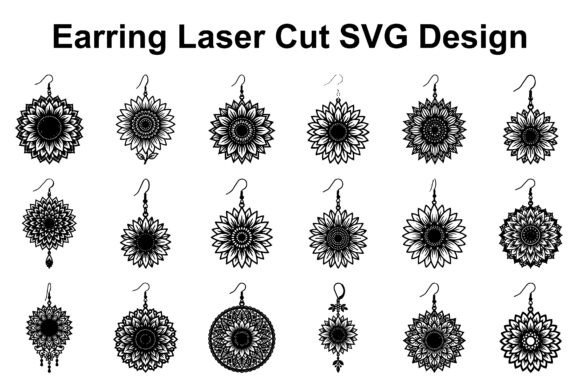
There is a specific warmth that comes with sunflower motifs in design. They evoke feelings of late summer, cheerfulness, and rustic elegance. When you are working on a project that needs to capture that energy—specifically in the realm of physical crafting and jewelry making—you need assets that translate well from a digital screen to a physical material. The Sunflower Earring SVG Bundle is designed precisely for this transition. It is not just a collection of images; it is a toolkit of 20 distinct vector designs tailored for laser cutting, Cricut crafting, and Glowforge projects. These files bridge the gap between digital design and handmade jewelry, offering a range of patterns from intricate floral mandalas to bold, ornamental styles.
Visual Characteristics and Design Appeal
When you look at the files included in this bundle, the first thing you notice is the variety within the theme. You aren't getting 20 versions of the same flower. Instead, you get a spectrum of interpretations. Some designs lean into the ornamental, featuring geometric symmetry that feels almost like a vintage badge or a modern logo. Others embrace the organic, flowing lines of a script font, mimicking the natural curves of petals and leaves.
The visual personality of these designs is versatile. For a project aiming for a boho fashion aesthetic, the more open, airy designs with negative space work perfectly. They allow the material—whether it is wood, acrylic, or leather—to show through, creating a textured, layered look. For something more bold and decorative, the mandala-style designs offer density and detail. These are the kinds of assets that function like a high-quality display font in typography; they are meant to be the focal point, catching the eye immediately. They possess a professional polish that elevates a project from a simple DIY craft to a piece of artisan jewelry.
Practical Applications: From Screen to Material
The true value of a premium vector file lies in its adaptability. As a designer or crafter, you know that a PNG file is often a dead end for physical production. You need scalability. You need to resize a design for a delicate stud earring or a statement dangle without losing resolution. This is where the inclusion of SVG, EPS, and AI files becomes critical. These vector formats ensure that every line remains crisp, whether you are cutting into 1/8" plywood or engraving onto acrylic.
Compatibility is the backbone of a smooth workflow. This bundle is structured to fit into the software you already use. If you are a Cricut user, the SVG files import cleanly, ready to be attached and cut. For those using Glowforge or LightBurn, the vector paths are optimized for laser precision, minimizing the need for manual node editing. This saves time, which is a crucial resource for small business owners and entrepreneurs who are fulfilling orders. The designs are also compatible with CNC machines and standard graphic design software like Adobe Illustrator and CorelDRAW, allowing for easy customization. You can edit the paths, subtract shapes, or combine elements to create something entirely unique.
Influence on Brand Perception and Hierarchy
For small business owners and jewelry makers, your product is your brand identity. The designs you choose to produce tell a story to your customer. Using the Sunflower Earring SVG Bundle helps establish a specific visual hierarchy. A sunflower is a recognizable symbol; it implies positivity, growth, and nature. By incorporating these patterns into your product line, you are aligning your brand with those values without saying a word.
Think about packaging design and social media graphics. The versatility of these files means you aren't limited to earrings. You can use the vectors to create branding assets. A mandala sunflower design could become a watermark on your photography, a stamp on your packaging, or a background element on your website. This creates brand consistency. When a customer sees your earrings on Instagram and then opens a package with the same motif, it reinforces brand recognition. It shows professionalism and attention to detail—traits that build trust with an audience aged 20-50 who values quality and aesthetic cohesion.
Choosing and Testing Your Designs
Selecting the right design from a bundle of 20 can feel overwhelming, so it helps to approach it with a strategy similar to choosing a font. You need to evaluate the "legibility" of the cut. Just as a script font can be hard to read at small sizes, an overly intricate laser cut design might be too fragile for certain materials or too small to cut cleanly.
Here is a practical guide to evaluating these assets for your specific needs:
- Material Constraints: If you are working with cardstock, you can handle more delicate, lace-like patterns. If you are cutting wood or MDF, you might want to select designs with thicker "strokes" and fewer small islands that could break off or burn.
- Scale and Resize: Test the design at your intended size before committing to expensive material. Does the detail get lost when the earring is only 1 inch wide? Does it look too sparse at 3 inches? The vector nature of the files allows you to test this instantly.
- Font Pairing (for branding): If you are using these designs alongside text (for a logo or packaging), consider the pairing. The intricate, floral nature of these sunflowers pairs well with clean, modern sans serif fonts. A bold, geometric sans serif can ground the organic shapes of the flower, creating a balanced visual hierarchy.
Customization and Commercial Use
The distinction between a hobbyist and an entrepreneur often comes down to licensing and customization. The files included in this bundle are designed for personal or commercial projects. This means you can sell the physical earrings you create without worrying about intellectual property issues. This is a massive relief for makers who sell on platforms like Etsy or at local craft fairs.
Furthermore, the ability to edit and customize is where the real creativity happens. Don't just treat these as "cut files." Treat them as design assets. You can layer them. Imagine cutting a solid back layer in wood and a detailed top layer in acrylic. You can change the color fills in software like Adobe Illustrator to mock up different product variations before you even turn on your machine.
Consider the following workflow tips to maximize the value of the bundle:
- Deconstruct: Take a complex mandala design and isolate a small section. That single section could become a charm for a necklace or a bracelet.
- Mirror and Weld: Use your cutting software to mirror a design and weld it together to create a symmetrical pendant that is double the width.
- Texture Application: If you are engraving rather than cutting through, use the SVG lines to create texture on the surface of acrylic or wood, adding depth to your jewelry pieces.
Final Thoughts on Quality and Workflow
Ultimately, the goal of using a resource like the Sunflower Earring SVG Bundle is to streamline your creative process while maintaining a high standard of output. You want to spend your time assembling and marketing your jewelry, not fixing broken vector nodes or tracing low-resolution images. By starting with a solid foundation of 20 well-designed, versatile patterns, you equip yourself with the tools to create stunning handmade jewelry that stands out in a crowded market. Whether you are making a gift for a friend or stocking inventory for your business, these designs offer the flexibility and quality needed to get the job done right.